
ChatGPT Work Checklist.

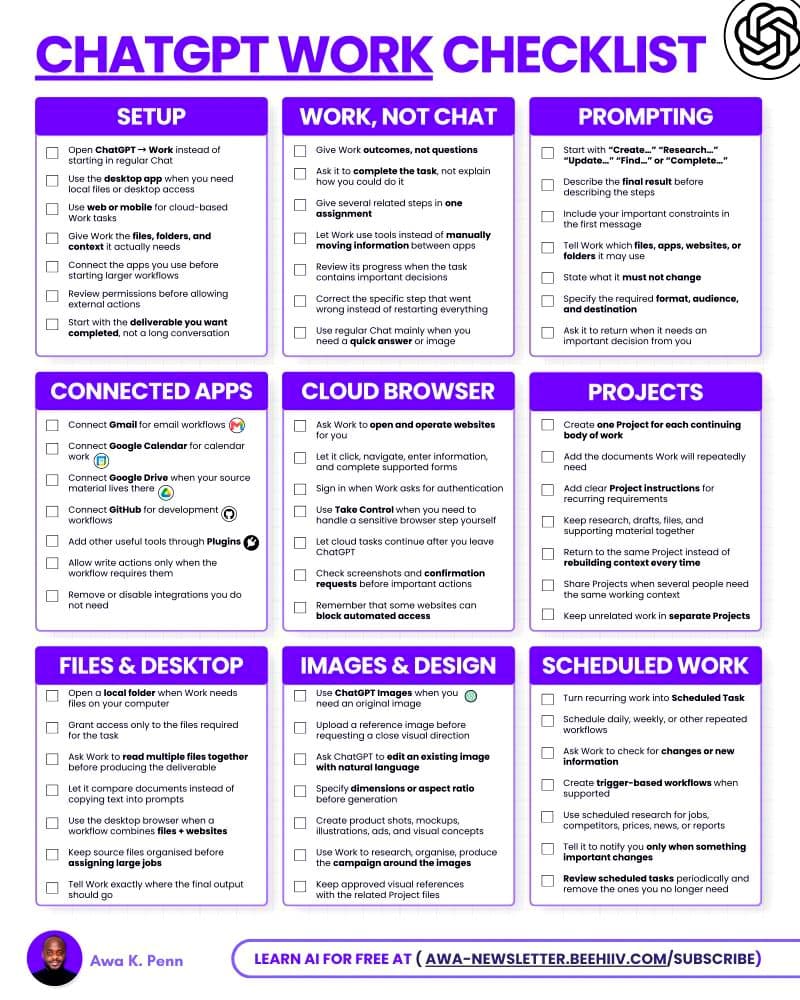
Everyone using ChatGPT like a chatbot is a year behind.
One question at a time? Old.
Copying files into chat? Old.
Doing every step yourself? Old.
Here’s what actually works with ChatGPT Work in 2026:
✦ Stop giving ChatGPT Work small questions.
Give it the final result you want, the files it needs, and the rules it must follow.
✦ Connect the apps you already use. Gmail, Google Calendar, Google Drive, GitHub, and Plugins can become part of the same workflow.
✦ Use Projects for work you keep coming back to. Add your files, instructions, research, and drafts once instead of starting from zero every time.
✦ Stop copying information between websites yourself. Let Work use the Cloud Browser to open pages, click, enter information, and complete supported tasks.
✦ Use the desktop app when Work needs local files on your computer. It can read several files together, compare them, and create one finished result.
✦ Turn repeat work into Scheduled Tasks. It can check for new jobs, price changes, reports, news, or other updates and tell you when something important changes.
It’s basically the system I use to get much more out of ChatGPT Work.
🎓 Build stronger skills in prompting, choosing AI tools, and working with foundation models through these resources & structured courses, with a personalized AI learning companion to guide you:
1. Prompting and LLM Application Design
↳ Write the clear brief that lets a model work unattended, set up step-by-step workflows, and judge outputs before you put your name on them.
2. Mastering Claude System Prompts, Artifacts and Projects
↳ Save your instructions and files once, reuse them in every chat.
3. Building AI Automation Stacks: Zapier, Make, n8n
Add your perspective
Sign in to comment, like, and build your reputation.